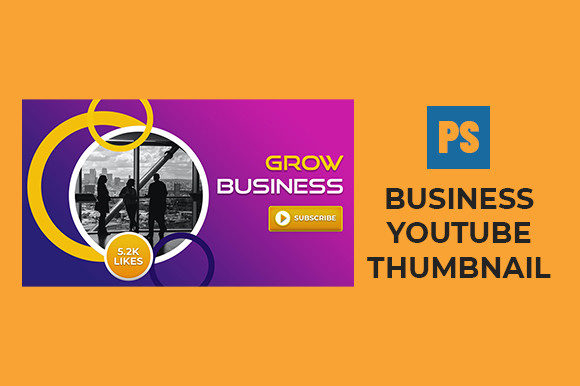
Mastering Your Brand with a Business YouTube Thumbnail
In the fast-paced world of online video, you often have less than a second to make an impression. Before a viewer even hears your voice or sees your content, they see your cover image. This is where a Business YouTube Thumbnail becomes your most critical asset. It is not just a picture; it is the digital storefront for your video content. For entrepreneurs, marketers, and small business owners, understanding how to leverage these visuals can mean the difference between a video that gathers dust and one that drives real engagement and sales.
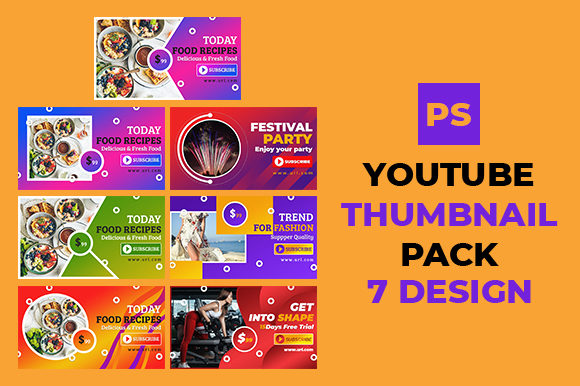
At its core, a business thumbnail is a custom-designed graphic that represents a specific video within a corporate or professional context. Unlike casual vlogs that might rely on spontaneous selfies or chaotic backgrounds, a business-oriented thumbnail requires intentionality. It needs to communicate trust, authority, and clarity instantly. When you utilize a high-quality template—specifically one that is 100% editable and organized in Adobe Photoshop—you gain the flexibility to maintain brand consistency across your entire channel without needing to be a graphic design expert.
Why Visual First Impressions Matter for Professionals
The primary purpose of a Business YouTube Thumbnail is to increase the Click-Through Rate (CTR). In the corporate sphere, your audience is often looking for solutions, education, or industry insights. They are scanning through dozens of options, and their eyes are drawn to images that look polished and relevant. A cluttered or low-resolution image suggests a lack of attention to detail, which can subconsciously signal that your business advice or product might be equally unrefined.
Using a unique layout that is sized correctly at 1280px x 720px ensures that your content looks sharp on everything from a massive desktop monitor to a small smartphone screen. This resolution is the industry standard for high-definition playback. When you start with a layered PSD file, you aren't just picking a pretty background; you are accessing a structured system. Each element, from the text overlay to the headshot of the speaker, sits on its own layer. This organization allows you to swap out names, change headlines, and adjust colors to match your company's branding guidelines in seconds.
Key Characteristics of Effective Corporate Designs
What makes a thumbnail suitable for multipurpose corporate use? First, it must be versatile. A good template works for a webinar announcement, a product demo, a CEO interview, or a quarterly report summary. The design should provide enough negative space to allow your text to breathe while keeping the focus on the subject matter.
Secondly, legibility is paramount. In a business context, you often need to convey specific data points or strong value propositions directly on the image. A well-organized layout ensures that your fonts remain readable even when scaled down. Third, the aesthetic should align with professional standards. This doesn't mean it has to be boring; rather, it should use color psychology effectively. For instance, blue often conveys trust and stability, while orange can suggest energy and innovation. Having a file that is fully editable means you can tweak these hues to fit your specific campaign goals.
Practical Applications Across Different Industries
The utility of a multipurpose Business YouTube Thumbnail extends far beyond a single type of content creator. Consider the various ways different professionals can apply these templates:
- Real Estate Agents: Use the template to showcase property tours. You can easily replace the background image with a stunning photo of a home and overlay text like "Luxury Villa Tour" or "Market Update."
- Financial Advisors: Create consistent visuals for market analysis videos. The organized layers allow you to insert stock charts or graphs cleanly without disrupting the design balance.
- Tech Startups: Launch product reveal videos with a sleek, modern look. The unique layout helps highlight new features while maintaining a futuristic yet professional vibe.
- Educators and Coaches: Develop series-based content where every episode looks part of a cohesive curriculum. Consistency builds recognition, making your students more likely to click on the next lesson.
- Consultants: Share case studies or client testimonials. A clean design ensures the focus remains on the human element and the results achieved.
For freelancers and hobbyists looking to monetize their skills, these thumbnails serve as a portfolio piece in themselves. They demonstrate to potential clients that you take your digital presence seriously. If you are running a podcast that doubles as a YouTube channel, using a standardized thumbnail format helps listeners identify your episodes instantly in a crowded feed.
Maximizing Efficiency with Editable PSD Files
One of the biggest hurdles for business owners is time. Creating a graphic from scratch for every single video is unsustainable. This is where the value of a 1 Adobe Photoshop PSD File truly shines. Because the file is layered and organized, you don't need to understand complex design theory to use it. You simply open the file, locate the text layer, type your new headline, and drag in your new photo.
This efficiency allows you to batch-create content. You could spend an hour on Monday morning preparing thumbnails for the entire week's worth of uploads. This consistency is key to algorithmic success. YouTube's system favors channels that upload regularly and maintain a coherent visual identity. When viewers see your distinctive style repeatedly, they begin to associate that look with quality content, increasing the likelihood of a click regardless of the specific topic.
Important Considerations Before You Start
While having a great template is a huge advantage, there are a few things to keep in mind to ensure you get the best results. First, always prioritize relevance. Just because a layout looks amazing doesn't mean it fits every message. Ensure the image you choose accurately reflects the video content to avoid misleading your audience, which can hurt your retention rates.
Second, pay attention to contrast. Even with a professional template, if your text color blends into the background image, it will be unreadable. Most high-quality PSDs come with smart objects or adjustment layers to help with this, but it is always wise to preview your design on a mobile device before publishing. Remember, a significant portion of your traffic will come from mobile users, so testing readability on smaller screens is essential.
Finally, think about your long-term branding. While it is tempting to chase trends with flashy fonts or neon colors, a Business YouTube Thumbnail should have longevity. Choose a style that you can see yourself using six months or a year from now. This approach builds a stronger brand equity over time. By investing in a unique, organized, and fully editable layout, you are setting a foundation for scalable growth. Whether you are a seasoned marketer or just starting your entrepreneurial journey, mastering this visual element is a practical step toward professional success in the digital landscape.